
Adjusting the height
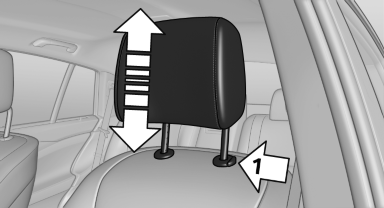
Adjusting the height
▷ To raise: pull.
▷ To lower: press the button, arrow 1, and push the head restraint down.
See also:
Arrow view
The following information is displayed during
destination guidance:
▷ Large arrow: indicates the current direction
of travel.
▷ Small arrow: indicates the next change in direction.
...
Warning of people in danger
If the system detects a person in the defined
area in front of the vehicle and if there is the danger
of a collision with this person, a warning
symbol appears in the Control Display and
Hea ...
Partition net
Do not let the partition net snap back into
place
Do not allow the partition net to snap back into
place; otherwise, there is a danger of injury and
the partition net could be damaged.◄
Wi ...