
Automatic locking
The setting is stored for the remote control currently in use.
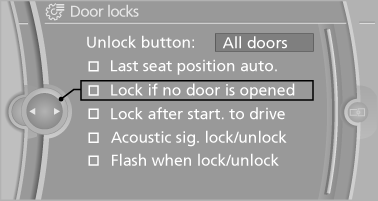
1. "Settings"
2. "Door locks"
3. Select the desired function:
▷ "Lock if no door is opened"
The vehicle locks automatically after a
short period of time if a door is not
opened.
▷ "Lock after start. to drive"
The vehicle locks automatically after
you drive away.
See also:
External temperature
External temperature warning
If the display drops to +37 ℉/
+3 ℃, a signal sounds.
A Check Control message is displayed.
There is the increased danger of
ice.
Ice on roads
Even ...
General information
Instructions for voice activation system.
To have the available spoken instructions read
out loud: ›Voice commands‹ ...
Charging the battery
In the vehicle, only charge the battery via the
terminals, in the engine compartment
with the engine off. ...