
Emergency detection of remote control
It is possible to switch on the ignition or start the engine in situations such as the following:
▷ Interference of radio transmission to remote control by external sources.
▷ Discharged battery in the remote control.
▷ Interference of radio transmission by mobile devices in close proximity to the remote control.
▷ Interference of radio transmission by charger while charging items such as mobile devices in the vehicle.
A Check Control message is displayed if an attempt is made to switch on the ignition or start the engine.
Starting the engine in case of emergency detection of remote control
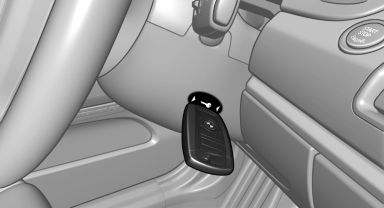
Starting the engine in case of emergency detection of remote control
Automatic transmission: if a corresponding Check Control message appears, hold the remote control, as shown, against the marked area on the steering column and press the Start/Stop button within 10 seconds while pressing the brake.
Manual transmission: if a corresponding Check Control message appears, hold the remote control, as shown, against the marked area on the steering column and press the Start/Stop button within 10 seconds while pressing the clutch.
See also:
Video playback
OverviewVideo playback possible via snap-in adapter. They can be operated via iDrive.
Sound is output over the vehicle speakers.
PlaybackFor your own safety, the video image is only displayed up to ...
Actions in the event of a flat tire
Normal tires
1. Identify the damaged tire.
Do this by checking the air pressure in all
four tires.
If the tire inflation pressure in all four tires is
correct, the Flat Tire Monitor may not hav ...
Tasks
Displaying the task list
Display tasks that are due within the next
90 days.
1. "Office"
2. "Tasks"
Sorting the task list
1. Select the header in the task list.
2. Select ...