
Buttons on the remote control
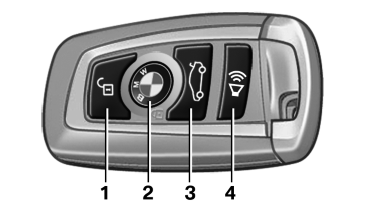
Buttons on the remote control
1 Unlocking
2 Locking
3 Opening the trunk lid
4 Panic mode in alarm system
See also:
Operation by voice commands
With voice activation system: Operation.
Without voice activation system: Depending on your equipment, the mobile phone
can be operated by voice as described below.
The list of short commands in t ...
Parking using the parking assistant
Personal responsibility
The parking assistant does not relieve the
driver of responsibility for the vehicle during the
parking procedure.Watch the parking space and parking procedure
closely a ...
Requirements
▷ The installed BMW Assist system is logged
in to a wireless communications network.
This network must be capable of transmitting
the services.
▷ To transmit position data, the vehic ...