
Components of the integrated Owner's Manual
The integrated Owner's Manual consists of three parts, which offer various levels of information or access possibilities.
Quick Reference Guide
Located in the Quick Reference is important information for the operation of the vehicle, the operation of basic vehicle functions or for what to do in the event of a flat tire. This information can also be displayed during driving.
Search by pictures
Information and descriptions based on illustrations can be searched via search by pictures.
This is helpful, for example, if the description of an outfitting package that cannot be named is needed.
Owner's Manual
Information and descriptions can be searched by direct entry of a search term via the index.
Select components
1.
 Press the button.
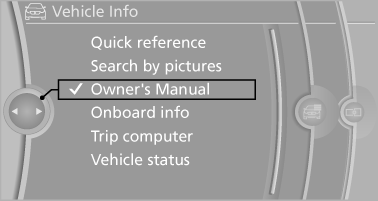
2. Turn the controller: open "Vehicle Info".
3. Press the controller.
4. Selecting desired range:
▷ "Quick reference"
▷ "Search by pictures"
▷ "Owner's Manual"
See also:
Automatic deactivation of the front
passenger airbags
The system determines whether the front passenger
seat is occupied by measuring the resistance
of the human body.
The front, knee, and side airbag on the front
passenger side are activated or d ...
Sitting safely
The ideal sitting position can make a vital contribution to relaxed, fatigue-free
driving. In conjunction with the safety belts, the head restraints and the airbags,
the seated position has a majo ...
General driving notes
Close the trunk lid Only drive with the trunk closed. Failure to
do so may endanger passengers or other road users or may damage the vehicle in the
event of an accident or a braking and evasive ma ...