
Switching between cases, letters and numbers
Depending on the menu, you can switch between entering upper and lower case, letters and numbers:
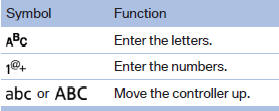
Without navigation system
Select the
 symbol.
See also:
Displaying images
1. Use the buttons or the thumbwheel of the
remote control to select an image.
2. Press the button.
Displaying images
3. Displaying images:
▷ Scroll using the menu navigation butto ...
AUX-IN port
At a glance
► For connecting audio devices, e.g., MP3
player. The sound is output on the vehicle
loudspeakers.
► Recommendation: use medium tone and
volume settings on the audio devic ...
The concept
When the low beams are switched on, this system
automatically switches the high beams on
and off or suppresses the light in the areas that
blind oncoming traffic. The procedure is controlled
b ...