
General information
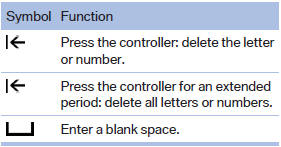
1. Turn the controller: select letters or numbers.
2. Select additional letters or numbers if needed.
3. "OK": confirm the entry.
See also:
Vehicle equipment
All standard, country-specific and optional
equipment that is offered in the model series is
described in this chapter. Therefore, equipment
is also described that is not available in a vehicle,
e ...
Switching on
The cooler can be operated at two levels.
1. Switch on the ignition.
2. Press the button once for
each cooling
level.
The highest cooling power is active when
two LEDs are lit.
If the coole ...
Radar sensors
The radar sensors are located under the rear
bumper.
The system may not be fully functional in the
following situations:
Dirty or icy bumper.
Stickers on the bumper.
A Check Control me ...