
All around the steering wheel
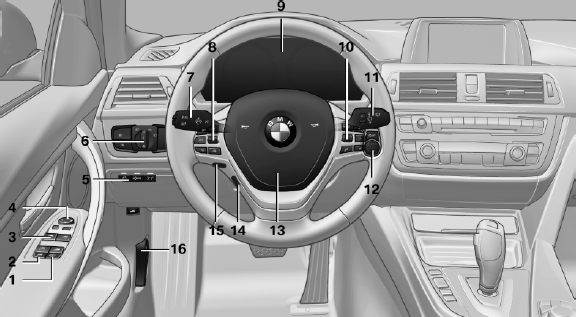
All around the steering wheel
1 Roller sunblinds
2 Rear window safety switch
3 Power windows
4 Exterior mirror operation
5 Driver assistance systems
 Active Blind Spot Detection
 Collision warning
 Lane departure warning
6 Lamps
 Front fog lamps
 Parking lamps
 Low beams
 Automatic headlamp control
Daytime running lights
Adaptive light control
High-beam Assistant
 Instrument lighting
7 Steering column stalk, left
 Turn signal
 High beams, headlamp flasher
 High-beam Assistant
 Roadside parking lamps
 Computer
8 Steering wheel buttons, left
 Store speed
 Resume speed
 Cruise control on/off, interrupting
 Active Cruise Control on/off, interrupting
 Increase distance
 Reduce distance
9 Instrument cluster
10 Steering wheel buttons, right
 Entertainment source
 Volume
 Voice activation
 Business mobile phone preparation package
Professional mobile phone preparation package
11 Steering column stalk, right
 Windshield wipers
 Rain sensor
 Clean the windshields and headlamps
 12 Start/stop the engine and switch the ignition on/off
 Auto Start/Stop function
13 Horn
14
 Steering wheel heating
15 Adjust the steering wheel
16 Unlock hood
See also:
Destination guidance with trafficbulletins
General information
Detour suggestions from the navigation system
can be manually accepted in the semi-dynamic
destination guidance. In the dynamic destination
guidance, they are automatically acc ...
Integrated Owner's Manual inthe vehicle
The integrated Owner's Manual can be displayed
on the Control Display. The equipment
and functions that are in the vehicle are described
therein. ...
Changing between panels
After a menu item is selected, e.g., "Radio", a
new panel is displayed. Panels can overlap.
▷ Move the controller to the left.
The current panel is closed and the previous
panel ...