
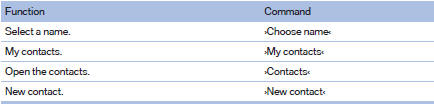
Contacts
See also:
Updating
Data are updated every time the mobile phone
is connected to the vehicle. Appointment entries,
tasks, notes and reminders can be updated
separately.
1. "Office".
2. "Current off ...
Parts and Accessories
For your own safety, use genuine parts and accessories
approved by BMW. When you purchase
accessories tested and approved by
BMW and Genuine BMW Parts, you simultaneously
acquire the assurance ...
Received calls
Displaying calls
The 20 calls that were last received are displayed.
1. "Telephone"
2. "Received calls"
Calling a number from the list
Selecting an entry.
The connection ...