
CD/multimedia
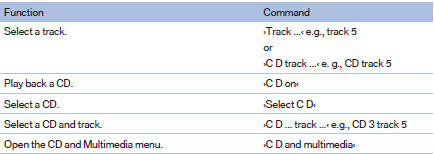
CD/DVD drive

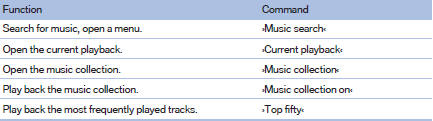
Music collection
External devices

Tone

See also:
Drive away without delay
Do not wait for the engine to warm up while the
vehicle remains stationary. Start driving right
away, but at moderate engine speeds.
This is the fastest way for the cold engine to
reach its oper ...
Front
A storage compartment is located in the center
armrest between the front seats.
Opening
Press the buttons next to the lock.
Locking the storage compartment
The storage compartment in the arm ...
General information
The navigation system can determine the precise
position of the vehicle, with the aid of satellites
and vehicle sensors, and can reliably
guide you to every entered destination.
Entries in st ...