
Vehicle information
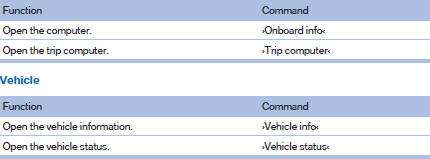
Computer
See also:
Concierge service
General information
The BMW Assist Concierge service offers information
on events, gas stations or hotels, and
provides phone numbers and addresses. Hotels
can be booked directly by the BMW Ass ...
My contacts
General informationList of all contacts from the vehicle.
Displaying contacts1. "Contacts"
2. "My contacts"
All contacts are listed in alphabetical order. Dependin ...
Voice operation
Vehicles equipped with the voice activation system:
operation.
Vehicles not equipped with the voice activation
system: depending on the equipment, the mobile
phone can be voice operated as desc ...