
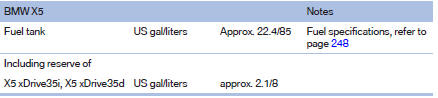
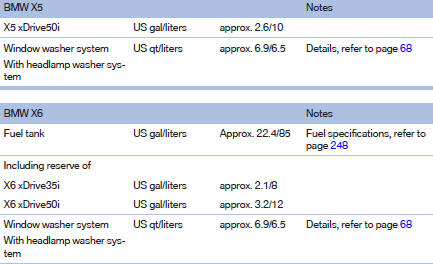
Capacities
See also:
Pinch protection system
If the closing force when closing the glass sunroof
exceeds a certain value, the closing movement
is stopped, beginning at approximately the
middle of the opening in the roof, or from the
tilt ...
Text messages
Calling the sender of a text message
1. Select the desired message.
2. Select the symbol.
Saving the sender in the contacts
1. Highlight the desired message.
2. Open "Options".
3. &qu ...
Fuses
Never attempt to repair a blown fuse and do
not replace a defective fuse with a substitute of another color or amperage rating;
otherwise, this could lead to a circuit overload, ultimately result ...