
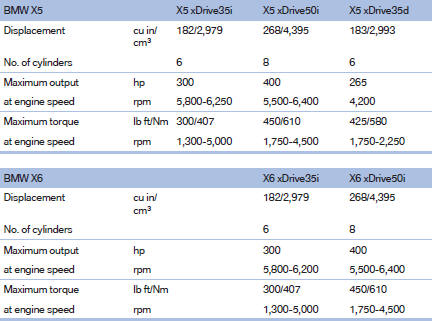
Engine specifications
See also:
Switching on automatically
Select transmission position R with the engine
running. ...
Malfunction
The cooler cannot be switched on or switches
off, e.g., when the cooling system overheats or
if the battery voltage is low. One of the LEDs
flashes.
Remedy the problem
1. If necessary, allow t ...
Functional readiness of the airbag
system
When the ignition is switch on,
the warning
lamp in the instrument cluster lights
up briefly and thereby indicates the operational
readiness of the entire airbag system
and the belt tension ...