
In cargo area
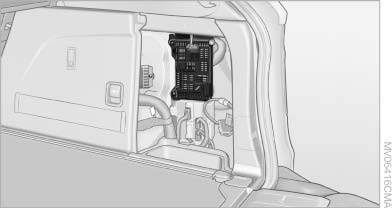
Open the right-hand side panel in the cargo area.
See also:
Setting the clock
1. Press the button. The main
menu is
displayed.
2. Turn the controller until "Settings" is highlighted,
and then press the controller.
3. If necessary, move the controller to the ...
Programmable memorybuttons
General information
The iDrive functions can be stored on the programmable
memory buttons and called up directly,
e.g., radio stations, navigation destinations,
phone numbers and entry points into ...
Exterior mirrors
At a glance
1 Adjusting
2 Left/right, Automatic Curb Monitor*
3 Fold in and out*
General information
The mirror on the passenger side is more curved
than the driver's side mirror.
Estimatin ...