
Turn signals, front
24-watt bulb, PY24W
1. Rotate bulb holder to the left and remove it along with the bulb.
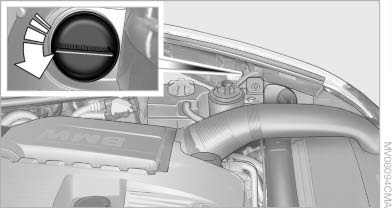
2. Rotate the bulb to the right along with the
socket and replace.
3. Install in the reverse order.
See also:
Headphones, vehicle
loudspeakers
Connecting the headphones
Normal headphones
Connect via the jack 1/8"/3.5 mm, on the rear CD/DVD player.
Infrared headphones
Connection via the infrared interface on the
lower edge of the s ...
Integrated universal remote control
The conceptThe integrated universal remote control can replace as many as three hand-held
transmitters for various remote-controlled devices, such as garage doors and gates or lighting systems. The ...
Switching on/off
Press the button. ...