
Turn signals, front
24-watt bulb, PY24W
1. Rotate bulb holder to the left and remove it along with the bulb.
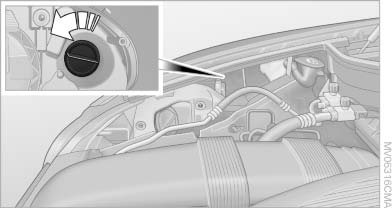
Turn signals, front
2. Rotate the bulb to the right along with the
socket and replace.
3. Install in the reverse order.
Side marker lamps, rear
Contact the service center for bulb replacement.
See also:
Control Display
Notes
▷ To clean the Control Display, follow the care
instructions.
▷ Do not place objects close to the Control
Display; otherwise, the Control Display can
be damaged.
Switching o ...
Camera
Camera
The camera is located near the base of the mirror.
Keep windshield clean and clear in the area in
front of the interior rear view mirror. ...
Condensation under the parked vehicle
When using the automatic climate control, condensation
water develops that exits underneath
the vehicle.
Therefore, traces of condensed water under the
vehicle are normal. ...