
Starting BMW Online
1. "BMW Assist" or "ConnectedDrive"
2. "BMW Online"
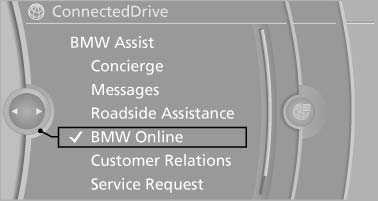
Starting BMW Online
3. If necessary, "OK".
The BMW Online home page is displayed.
See also:
Requirements
The installed BMW Assist system is logged
in to a wireless communications network.
This network must be capable of transmitting
the services.
To transmit position data, the vehicle must ...
Car care products
BMW recommends using cleaning and care
products from BMW, since these have been
tested and approved.
Car care and cleaning products
Follow the instructions on the container.
When cleaning the ...
Tire inflation pressures at max. speeds above 100 mph/160 km/h
Speeds above 100 mph/160 km/h
In order to drive at maximum speeds in excess
of 100 mph/160 km/h, please observe, and,
if necessary, adjust tire pressures for speeds
exceeding 100 mph/160 km/h ...