
Entering a phone number
Dialing a number
1. "Telephone"
2. "Dial number"
3. Select the digits individually.
4. Select the
symbol.
Select the
symbol.
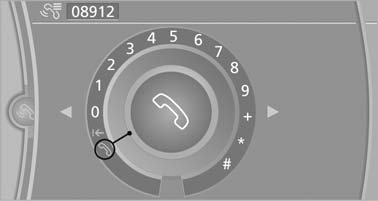
Dialing a number
The phone number can also be entered by voice.
See also:
Playback
Loading the CD/DVD player
Insert the CD/DVD with the printed side up.
Playback begins automatically.
Reading can take a few minutes with compressed
audio files.
Starting playback
A CD/DVD is lo ...
Programmable memory buttons
General information
The Owner's Manual can be stored on the programmable
memory buttons and called up directly.
Storing
1. "Owner's Manual" Select via the iDrive.
2. Press the desired ...
Messages
General information
Whether or not text messages and e-mails from
the mobile phone are displayed depends on
whether transmission from the mobile phone to
the vehicle is supported. Text messages ...