
Incoming call
Receiving calls
If the number of the caller is stored in the phone book and is transmitted by the network, the name of the contact is displayed. Otherwise, only the phone number is displayed.
If more than one phone number is assigned to a contact, only the name of the contact is displayed.
For calls on the additional telephone, the number is only displayed if it is transmitted by the network.
An incoming call to the additional telephone is automatically rejected if there is an active call on the other telephone.
Accepting a call
 Press the button
on the steering wheel.
Press the button
on the steering wheel.
or  "Accept"
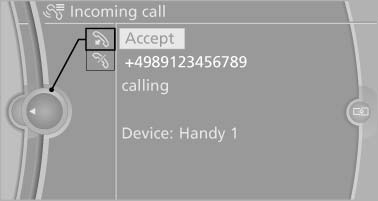
Accepting a call
Rejecting a call
 "Reject"
Ending a call
 Press the button
on the steering wheel.
Press the button
on the steering wheel.
or 1. "Telephone"
2. "Active calls"
3.  "End call"
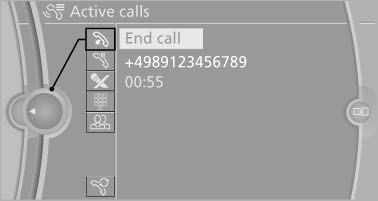
End call
See also:
Customer Relations
At a glance
Contact Customer Relations for information on
all aspects of your vehicle.
Calling Customer Relations
Vehicles not equipped with BMW
Assist or TeleService
1. "BMW Assist" ...
Fuel quality
Fuels that are marked on the gas pump as containing
metal must not be used.
Refuel only with unleaded gasoline without
metallic additives.
Do not refuel with any leaded gasoline or gasoline
with ...
Fuel gauge
The vehicle inclination may
cause the display to vary.
Notes on refueling. ...