
Connecting
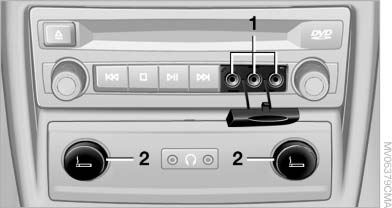
Connecting
1 Connections for audio/video cables. Watch the colors of the sockets when connecting.
Yellow socket: video White socket: audio on left Red socket: audio on right
2 Power supply for external device: socket with removable cap.
See also:
Status field symbols
The symbols are grouped into various categories.
Radio symbols
Symbol
Meaning
Traffic bulletins switched on.
HD Radio is switched on.
Satellite radio ...
Tool kit
The tool kit is located in a fold-down cover in the
trunk lid.
Unscrew the wing nut to open. ...
Special destinations
General information
Even with the most current navigation data, information
regarding particular individual destinations
may have changed. For instance, certain
gas stations may not be operating.
...