
Controls
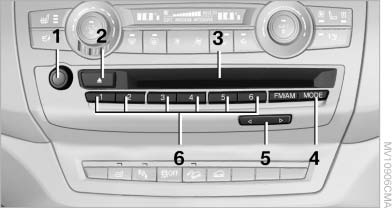
Controls
1 Volume, on/off
2 Eject CD/DVD
3 CD/DVD drive
4 Change the entertainment source
5 Change station/track
6 Programmable memory buttons
See also:
Closing the trunk lid
Drive with the trunk lid closed
Only drive with the tailgate closed; otherwise,
in the event of an accident or braking or
evasive maneuvers, passengers or other road
users may be injured or th ...
Display
Display
▷ Lines, arrow 1: the system is activated.
▷ Arrows, arrow 2: at least one lane marking
was detected and warnings can be issued. ...
Reading out loud
Text messages, e-mails, appointment entries,
tasks, and notes can be read out loud.
1. Select the desired message, appointment,
task, or note.
2. Select the symbol.
The following options are a ...